

If you’re self-hosting Typebot, sponsoring
me is a great way to give back to
the community and to contribute to the long-term sustainability of the
project. It also comes with some perks like priority support and private
workshops. ❤️
General
For previews, the first URL in
NEXT_PUBLIC_VIEWER_URL must use a different hostname from NEXTAUTH_URL. A different port is not enough because browser cookies ignore ports. For example, locally use NEXTAUTH_URL=http://localhost:3000 and NEXT_PUBLIC_VIEWER_URL=http://127.0.0.1:3001.
Email (Auth, notifications)
Used for sending email notifications and authenticationSMTP configuration tests in the builder
The Send Email block’s SMTP configuration test permits public SMTP destinations by default. To permit an internal IPv4 SMTP relay, add its exact hostname toSSRF_ALLOWED_HOSTS (comma-separated), for example SSRF_ALLOWED_HOSTS=smtp.internal.example. This existing setting only permits RFC1918 ranges (10/8, 172.16/12 and 192.168/16, including IPv4-mapped addresses). It never permits metadata, loopback, link-local, IPv6 unique-local or other blocked special-use destinations, even in development. This instance-wide exception makes that relay available to every authenticated user who can test an SMTP configuration; it is not a workspace permission.
Every DNS answer must pass the policy. The test connects to the first validated IP, preserving the hostname for TLS certificate verification and STARTTLS. Automatic fallback to another IP is disabled; if the first address is unreachable, the test fails. Use an ASCII/punycode hostname or an IP literal and an integer port between 1 and 65535. The notification/authentication SMTP settings above and execution of stored Send Email credentials are separate paths and are unchanged by this test endpoint policy.
Google Auth
Requirements
Requirements
- Head over the Credentials tab: https://console.developers.google.com/apis/credentials
-
Create a OAuth client ID. This will be your
GOOGLE_AUTH_CLIENT_IDandGOOGLE_AUTH_CLIENT_SECRETMake sure to set the following scopes:userinfo.emailThe “Authorized redirect URIs” used when creating the credentials must include your full domain and end in the callback path:- For production:
- https://<YOUR_DOMAIN>/api/auth/callback/google
- For development:
- For production:
Google Sheets
Requirements
Requirements
- Enable the following APIs in the Google Cloud Console: Google Sheets API, Google Picker API
- Head over the Credentials tab: https://console.developers.google.com/apis/credentials
-
Create an API key. This will be your
NEXT_PUBLIC_GOOGLE_SHEETS_API_KEY -
Create a OAuth client ID. This will be your
GOOGLE_SHEETS_CLIENT_IDandGOOGLE_SHEETS_CLIENT_SECRETMake sure to set the following scopes located in your OAuth Consent Screen:spreadsheets,drive.filehttps://developers.google.com/identity/protocols/oauth2/scopes The “Authorized redirect URIs” used when creating the credentials must include your full domain and end in the callback path:- For production:
- https://<YOUR_DOMAIN>/api/credentials/google-sheets/callback
- For development:
- For production:
- To avoid having to always reconnect a Google Sheets credentials every 7 days, you need to promote your OAuth client to production (https://developers.google.com/nest/device-access/reference/errors/authorization#refresh_token_keeps_expiring)
Gmail
Requirements
Requirements
- Enable the following APIs in the Google Cloud Console: Google Sheets API, Google Picker API
- Head over the Credentials tab: https://console.developers.google.com/apis/credentials
-
Create a OAuth client ID. This will be your
GMAIL_CLIENT_IDandGMAIL_CLIENT_SECRETMake sure to set the following scopes located in your OAuth Consent Screen:gmail.send,gmail.labels,userinfo.profile,userinfo.emailhttps://developers.google.com/identity/protocols/oauth2/scopes The “Authorized redirect URIs” used when creating the credentials must include your full domain and end in the callback path:- For production:
- https://<YOUR_DOMAIN>/oauth/redirect
- For development:
- For production:
- To avoid having to always reconnect credentials every 7 days, you need to promote your OAuth client to production (https://developers.google.com/nest/device-access/reference/errors/authorization#refresh_token_keeps_expiring)
Google Fonts
Used authentication in the builder and for the Google Sheets integration step.Requirements
Requirements
- Enable the following API in the Google Cloud Console: Web Fonts Developer API
- Head over the Credentials tab: https://console.developers.google.com/apis/credentials
-
Create an API key with access to the Web Fonts Developer API. This will be your
NEXT_PUBLIC_GOOGLE_FONTS_API_KEY
GitHub (Auth)
Used for authenticating with GitHub. By default, it uses the credentials of a Typebot-dev app. You can create your own GitHub OAuth app here. The Authorization callback URL should be$NEXTAUTH_URL/api/auth/callback/github
GitLab (Auth)
Used for authenticating with GitLab. Follow the official GitLab guide for creating OAuth2 applications here. The Authorization callback URL should be$NEXTAUTH_URL/api/auth/callback/gitlab
Facebook (Auth)
You can create your own Facebook OAuth app here. The Authorization callback URL should be$NEXTAUTH_URL/api/auth/callback/facebook
Azure AD (Auth)
If you are using Azure Active Directory for the authentication you can set the following environment variables. The Authorization callback URL should be$NEXTAUTH_URL/api/auth/callback/azure-ad
Keycloak (Auth)
Used for authenticating with Keycloak. Follow the official Keycloak guide for creating OAuth2 applications here.Custom OAuth Provider (Auth)
Your provider needs to support the OpenID Connect standards.
For
*_PATH parameters, you can use dot notation to access nested properties (i.e. account.name).
The Authorization callback URL should be: $NEXTAUTH_URL/api/auth/callback/custom-oauth
S3 Storage (Media uploads)
Used for uploading images, videos, etc… It can be any S3 compatible object storage service (Minio, Digital Oceans Space, AWS S3…)
Note that for AWS S3, your endpoint is usually:
s3.<S3_REGION>.amazonaws.com
In order to function properly, your S3 bucket must be configured. Make sure to read through the S3 configuration doc.
Giphy (GIF picker)
Used to search for GIF. You can create a Giphy app hereUnsplash (image picker)
Used to search for images. You can create an Unsplash app herePexels (video picker)
Used to search for videos. You can create a Pexels app hereTolgee (i18n contribution dev tool)
If you’d like to join contribute to Typebot’s translation join the Discord
server and ask for an access to Tolgee in the
#contributors
channel.
WhatsApp (Preview)
In order to be able to test your bot on WhatsApp from the Preview drawer, you need to set up a WhatsApp business app.Requirements
Requirements
1. Create a WhatsApp Meta app
2. Get the App Secret and System User token
-
Go to your app’s
App settings > Basicpage and copy the App Secret. This will be used asWHATSAPP_PREVIEW_APP_SECRETin your builder configuration. - Go to your System users page and create a new system user that has access to the related.
- Token expiration:
Never - Available Permissions:
whatsapp_business_messaging,whatsapp_business_management
- The generated token will be used as
META_SYSTEM_USER_TOKENin your viewer configuration. - Click on
Add assets. UnderApps, look for your app, select it and checkManage app
3. Get the phone number ID
-
Go to your WhatsApp Dev Console
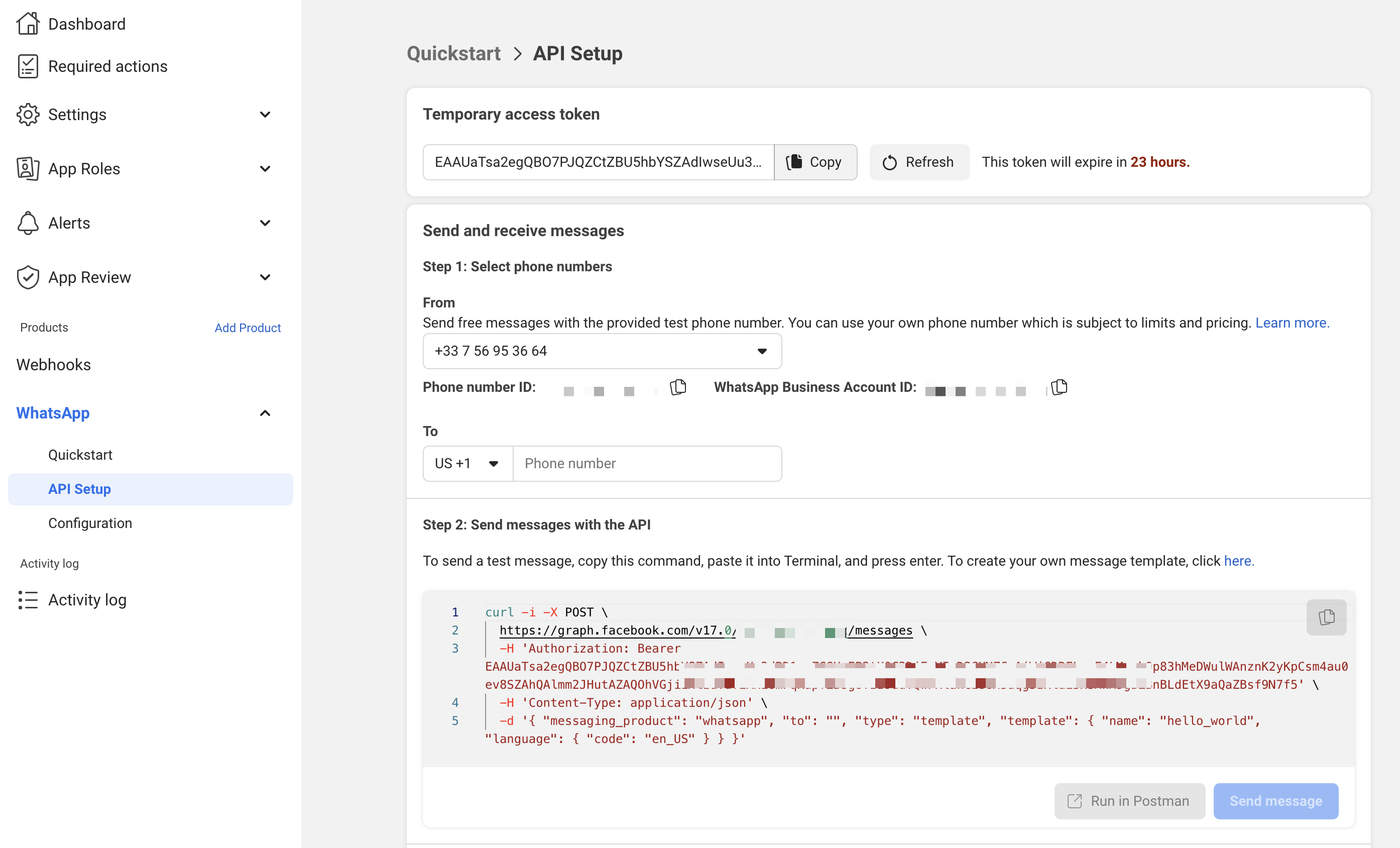
-
Add your phone number by clicking on the
Add phone numberbutton. -
Select the newly created phone number in the
Fromdropdown list and you will see right below the associatedPhone number IDThis will be used asWHATSAPP_PREVIEW_FROM_PHONE_NUMBER_IDin your viewer configuration.
4. Set up the webhook
- Head over to
Quickstart > Configuration. Edit the webhook URL to$NEXTAUTH_URL/api/v1/whatsapp/preview/webhook. Set the Verify token to$ENCRYPTION_SECRETand click onVerify and save. - Add the
messageswebhook field.
5. Set up the message template
- Head over to
Messaging > Message Templatesand click onCreate Template - Select the
Utilitycategory - Give it a name that corresponds to your
WHATSAPP_PREVIEW_TEMPLATE_NAMEconfiguration. - Select the language that corresponds to your
WHATSAPP_PREVIEW_TEMPLATE_LANGconfiguration. - You can format it as you’d like. The user will just have to send a message to start the preview.
Redis
In Typebot, Redis is optional and is used to:- Rate limit the sign in requests based on user IP
- Enable multiple media upload on WhatsApp
PartyKit
PartyKit is optional and is used to make the webhook block work. The PartyKit configuration is located inpackages/partykit folder. You can deploy the server into production using bun deploy. You can find more information about PartyKit deployment in their official documentation.
Others
The related environment variables are listed here but you are probably not interested in these if you self-host Typebot.Vercel (custom domains)
Vercel (custom domains)
Telemetry
Telemetry
OpenTelemetry
OpenTelemetry
PostHog
PostHog
System labels
System labels