> ## Documentation Index
> Fetch the complete documentation index at: https://docs.typebot.com/llms.txt
> Use this file to discover all available pages before exploring further.
# Subscription
## Upgrade plan
In order to upgrade your workspace plan and increase your monthly limits, you need to open the `Settings & Members` modal in your homepage and navigate on the `Billing & Usage` tab.
This tab displays your bots total usage, your current plan and paid invoices.
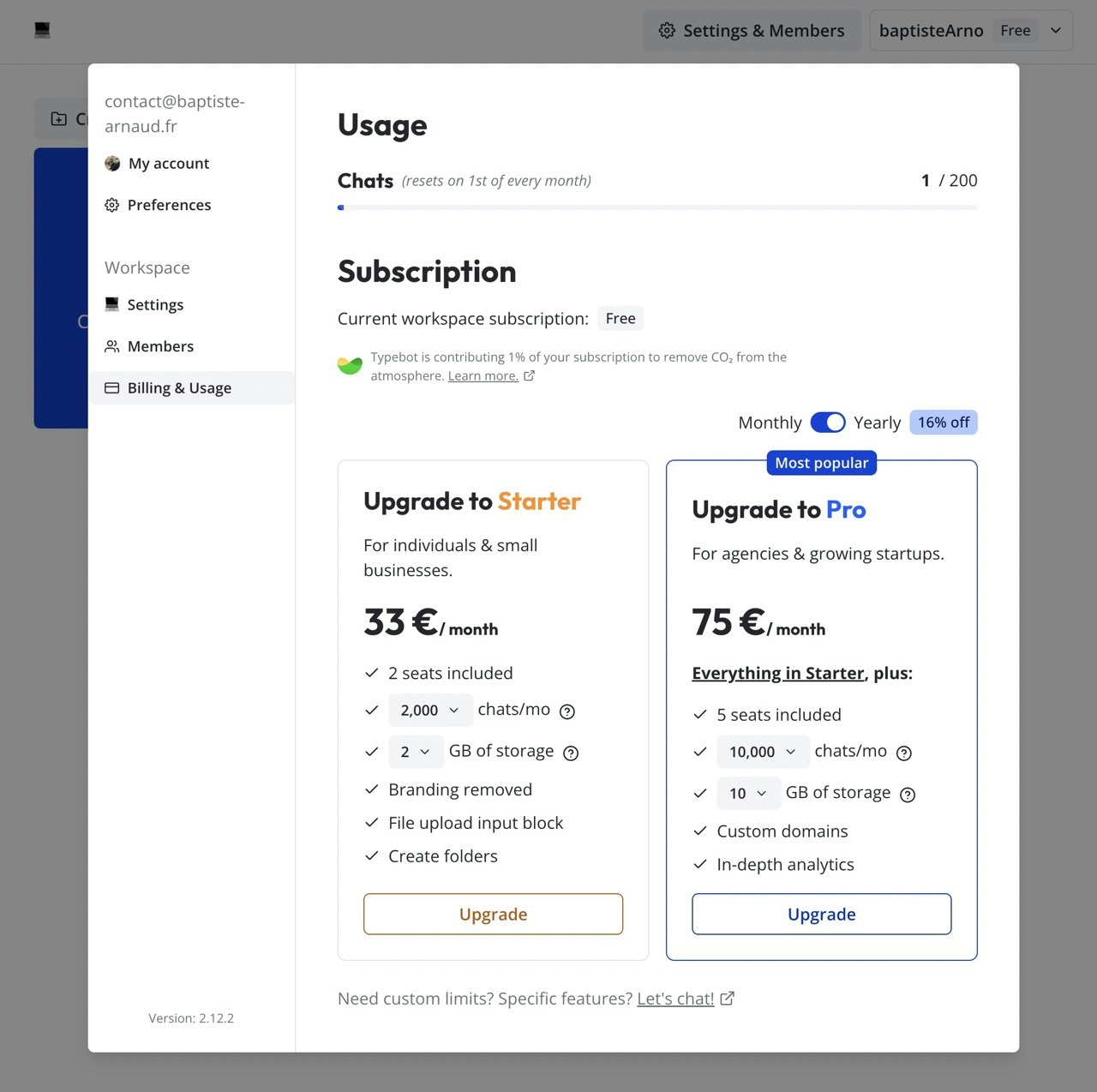 You can choose to upgrade to your desired plan here.
## Cancel or downgrade plan
To cancel or downgrade your workspace plan:
From your homepage, open the `Settings & Members` modal.
Navigate to the `Billing & Usage` tab.
Click the `Billing portal` button. This redirects you to the Stripe-hosted billing portal.
From the billing portal you can cancel your subscription or switch to a different plan.
Once the current billing period ends, the workspace automatically reverts to the **Free** plan.
## Add a VAT ID for B2B reverse charge
If you are a VAT-registered business in the EU (outside of France), you can add your VAT ID to your billing details so that future invoices are issued under the reverse charge mechanism, without VAT.
From your homepage, open the `Settings & Members` modal, navigate to the `Billing & Usage` tab and click `Billing portal`.
In the billing portal, click `Update information` in the billing details section.
Click `Add tax ID`, pick your country prefix (for example `EU VAT`) and paste your VAT number, then save.
Adding a VAT ID only affects **future invoices**. Past invoices cannot be reissued without VAT, even after a valid VAT ID is added. Add your VAT ID before your next renewal to make sure the reverse charge is applied.
Without a valid VAT ID on file, your billing country's destination VAT is charged on every invoice as for a standard B2C customer.
## Free plan limits
When your workspace is on the Free plan, the following limits apply:
* **200 chats per month.** A chat is counted once a user starts a conversation with your bot. Additional messages from the same user within the same session do not count.
* **1 seat.** You cannot invite members to a Free workspace. To collaborate with others, upgrade to Starter or above.
Higher limits are available on Starter, Pro, and Enterprise plans. See the [pricing page](https://typebot.com/pricing) for an up-to-date comparison.
You can choose to upgrade to your desired plan here.
## Cancel or downgrade plan
To cancel or downgrade your workspace plan:
From your homepage, open the `Settings & Members` modal.
Navigate to the `Billing & Usage` tab.
Click the `Billing portal` button. This redirects you to the Stripe-hosted billing portal.
From the billing portal you can cancel your subscription or switch to a different plan.
Once the current billing period ends, the workspace automatically reverts to the **Free** plan.
## Add a VAT ID for B2B reverse charge
If you are a VAT-registered business in the EU (outside of France), you can add your VAT ID to your billing details so that future invoices are issued under the reverse charge mechanism, without VAT.
From your homepage, open the `Settings & Members` modal, navigate to the `Billing & Usage` tab and click `Billing portal`.
In the billing portal, click `Update information` in the billing details section.
Click `Add tax ID`, pick your country prefix (for example `EU VAT`) and paste your VAT number, then save.
Adding a VAT ID only affects **future invoices**. Past invoices cannot be reissued without VAT, even after a valid VAT ID is added. Add your VAT ID before your next renewal to make sure the reverse charge is applied.
Without a valid VAT ID on file, your billing country's destination VAT is charged on every invoice as for a standard B2C customer.
## Free plan limits
When your workspace is on the Free plan, the following limits apply:
* **200 chats per month.** A chat is counted once a user starts a conversation with your bot. Additional messages from the same user within the same session do not count.
* **1 seat.** You cannot invite members to a Free workspace. To collaborate with others, upgrade to Starter or above.
Higher limits are available on Starter, Pro, and Enterprise plans. See the [pricing page](https://typebot.com/pricing) for an up-to-date comparison.