> ## Documentation Index
> Fetch the complete documentation index at: https://docs.typebot.com/llms.txt
> Use this file to discover all available pages before exploring further.
# FAQ
export const LoomVideo = ({id}) =>
;
## How Typebot executes the blocks between each user input?
## Why some of my results are empty?
Your typebot collects results as soon as your user answers the first input. If other inputs have a blank answer, it means the user never answered them and left the bot.
## How can I delete a block or an edge?
You can right-click on most elements in the graph to open up a contextual menu.
## Is human takeover is available on Typebot?
Live chat is not natively integrated. Typebot is specifically built for async chats. You can still have a human takeover feature using the [Chatwoot block](/editor/blocks/integrations/chatwoot). It will open a Chatwoot live chat box whenever the block is hit.
You can also implement great customer support with Typebot by using a ticketing system such as [Freshdesk](https://freshdesk.com/) or [Zendesk](https://www.zendesk.com/). You can create a ticket each time your user answers the bot.
## Is there an affiliate program available?
I'm not planning on having a Typebot affiliation program.
As a customer, I don't like when someone promotes a tool with an affiliation because we could think that the only reason he's promoting it is that he can win big comparing with other tools.
Natural recommendations resonate a lot more with me. My goal is to create the best user experience possible, so I really hope you will recommend Typebot for free. 🤝
## How can I change my password
Typebot doesn't store any password. Its login works with Github, Google, Facebook and Magic link email.
## Can I set a variable with the Script block?
No, the script block is only meant to execute a script. You can't set a variable with/in it. If you need to set a variable with some code, you can use the [Set variable block](/editor/blocks/logic/set-variable).
## I don't see my bots after login, where did they go?
Typebots live inside a workspace, and each account can belong to several workspaces. A common case is having a personal Free workspace and being invited to a team workspace: after login you land on one of them, and your bots may actually be in the other.
Open the workspace dropdown at the top-left of the dashboard and switch to the workspace that contains your bots.
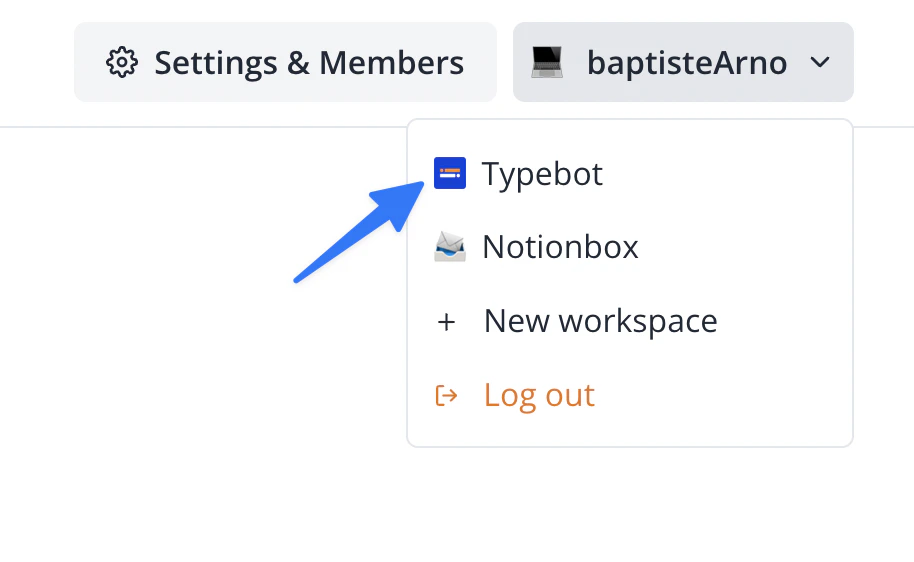 If the expected workspace is missing from the dropdown, make sure you are logged in with the same email that was invited to the team workspace. See [workspace overview](/workspace) for more details.
## Is there a status page?
Yes. The public status page is available at [status.typebot.io](https://status.typebot.io). It reports uptime and incidents for the Typebot Cloud services (builder, viewer, API). You can subscribe there to get notified when an incident is opened or resolved.
## Can I have a persistent text input always visible at the bottom of the chat?
No. Typebot is a flow-driven conversation engine: the input shown at any moment is the one defined by the current block. There is no native way to display a persistent free-text input that stays visible outside of an input block.
If you need that kind of UX, you have two options:
* **Accept user keywords at any input.** Add a [Reply event](/editor/events/reply) that reacts to specific keywords (see the [user commands guide](/guides/user-commands)). The input still belongs to the current block, but the user can type commands like `help` or `restart` from anywhere.
* **Build a custom UI.** Use the [continueChat HTTP API](/api-reference/chat/continue-chat) to drive the conversation yourself and render whatever chat interface you want, including a persistent input. This is significantly more work than using the official embeds.
If the expected workspace is missing from the dropdown, make sure you are logged in with the same email that was invited to the team workspace. See [workspace overview](/workspace) for more details.
## Is there a status page?
Yes. The public status page is available at [status.typebot.io](https://status.typebot.io). It reports uptime and incidents for the Typebot Cloud services (builder, viewer, API). You can subscribe there to get notified when an incident is opened or resolved.
## Can I have a persistent text input always visible at the bottom of the chat?
No. Typebot is a flow-driven conversation engine: the input shown at any moment is the one defined by the current block. There is no native way to display a persistent free-text input that stays visible outside of an input block.
If you need that kind of UX, you have two options:
* **Accept user keywords at any input.** Add a [Reply event](/editor/events/reply) that reacts to specific keywords (see the [user commands guide](/guides/user-commands)). The input still belongs to the current block, but the user can type commands like `help` or `restart` from anywhere.
* **Build a custom UI.** Use the [continueChat HTTP API](/api-reference/chat/continue-chat) to drive the conversation yourself and render whatever chat interface you want, including a persistent input. This is significantly more work than using the official embeds.