> ## Documentation Index
> Fetch the complete documentation index at: https://docs.typebot.com/llms.txt
> Use this file to discover all available pages before exploring further.
# Google Sheets
With the Google Sheets integration step, you can inject, update or get data from Google Spreadsheets. For an overview of how it works check out this video
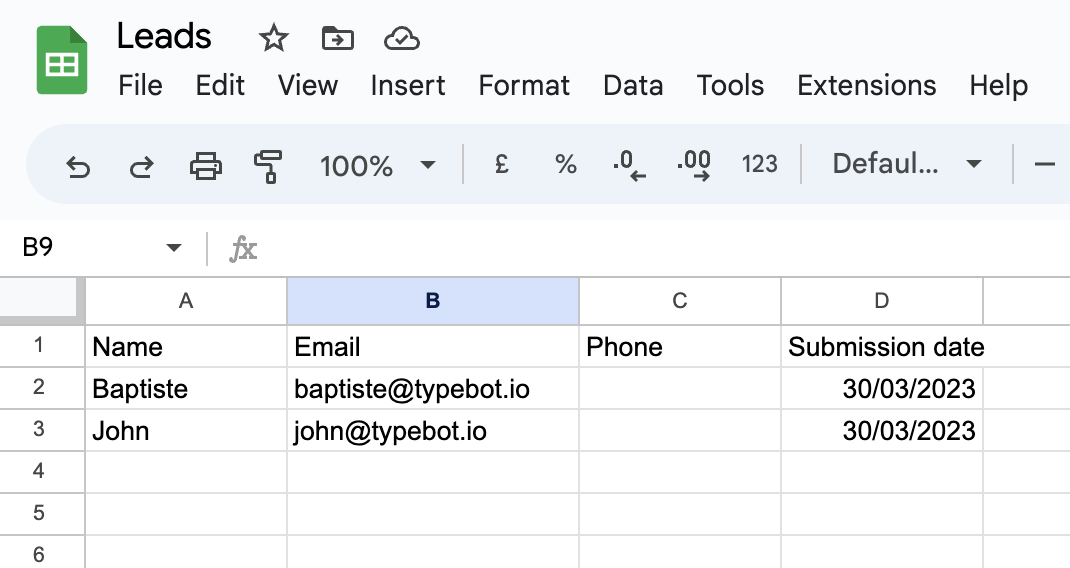
In order to properly work, your spreadsheet must have its first row as a header row. And all header name should be unique. This is how the block knows which column to update:
## How to add the submission date to my row?
For this, you will need to set a new variable with the value "Now" before the Google Sheets block. Then you can simply use this variable in the Google Sheets block.
## Advanced
## Limitations
Google Sheets API is subject to hard limits set by Google:
* 60 read requests per minute
* 60 write requests per minute
Knowing that, we suggest that you limit the number of Google Sheets blocks you use in your bot. If you need to get the data from multiple sheets, we suggest that you first aggregate the data in a single sheet and then use the Google Sheets block to get the data from that single sheet.
## Troubleshooting
The Google sheets block didn't insert or update a row but was supposed to? Make sure to check the [logs](/results/overview#logs). If you still can't figure out what went wrong, shoot me a message using the chat button directly in the tool 👍
 ## How to add the submission date to my row?
For this, you will need to set a new variable with the value "Now" before the Google Sheets block. Then you can simply use this variable in the Google Sheets block.
## Advanced
## How to add the submission date to my row?
For this, you will need to set a new variable with the value "Now" before the Google Sheets block. Then you can simply use this variable in the Google Sheets block.
## Advanced