> ## Documentation Index
> Fetch the complete documentation index at: https://docs.typebot.com/llms.txt
> Use this file to discover all available pages before exploring further.
# Action
An action is what a block can do when it is executed with Typebot. A [block](./block) can have multiple actions.
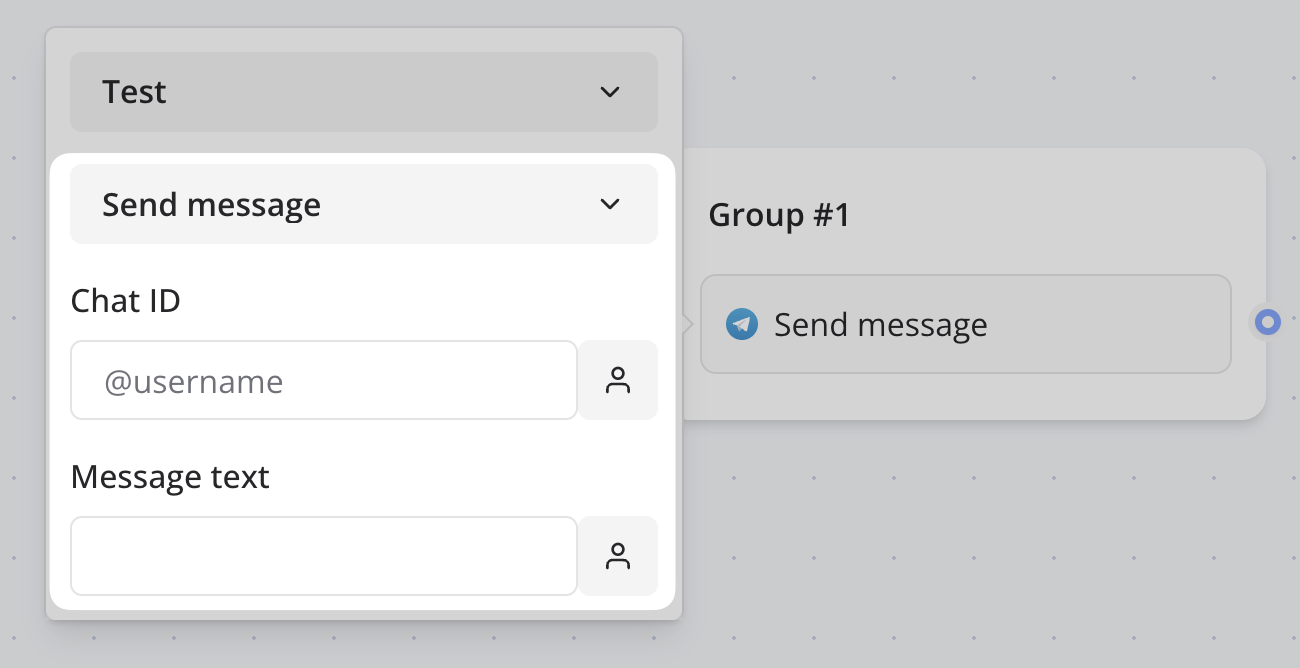
Here is the `sendMessage` action definition:
```ts theme={null}
import { createAction, option } from "@typebot.io/forge";
import { auth } from "../auth";
export const sendMessage = createAction({
auth,
name: "Send message",
options: option.object({
chatId: option.string.meta({ layout: {
label: "Chat ID",
placeholder: "@username",
} }),
text: option.string.meta({ layout: {
label: "Message text",
input: "textarea",
} }),
}),
});
```
The action execution logic is defined separately in a `handlers.ts` file. See
the [Run](./run) documentation for more information.
 ## Props
The name of the action.
If the block requires authentication, the auth object needs to be passed to
the action.
If the block has options defined (see [block props](./block#props)), this
needs to be provided here.
The action configuration options. See Options for more
information.
If the action can stream content, this function should return the variable ID
that will receive the streamed content. See{" "}
Server function + stream for more
information.
If the action displays an embed bubble that waits for an event, this function
should return the variable ID where the event data will be saved. See{" "}
Display embed bubble for more
information.
A function that returns an array of variable IDs that will be set by this
action. This is used for analytics and tracking purposes.
An array of fetcher references used to populate dropdown options dynamically.
Each fetcher should be exported from the action file and implemented in the
handlers file. See Fetcher for more information.
An array of block IDs that this action can be converted into. This allows
users to easily switch between similar blocks while preserving their
configuration.
The action execution logic is now defined separately in a `handlers.ts` file
using `createActionHandler()` and `createFetcherHandler()`. Check out the{" "}
Run documentation for more information on how to implement
handlers.
## Props
The name of the action.
If the block requires authentication, the auth object needs to be passed to
the action.
If the block has options defined (see [block props](./block#props)), this
needs to be provided here.
The action configuration options. See Options for more
information.
If the action can stream content, this function should return the variable ID
that will receive the streamed content. See{" "}
Server function + stream for more
information.
If the action displays an embed bubble that waits for an event, this function
should return the variable ID where the event data will be saved. See{" "}
Display embed bubble for more
information.
A function that returns an array of variable IDs that will be set by this
action. This is used for analytics and tracking purposes.
An array of fetcher references used to populate dropdown options dynamically.
Each fetcher should be exported from the action file and implemented in the
handlers file. See Fetcher for more information.
An array of block IDs that this action can be converted into. This allows
users to easily switch between similar blocks while preserving their
configuration.
The action execution logic is now defined separately in a `handlers.ts` file
using `createActionHandler()` and `createFetcherHandler()`. Check out the{" "}
Run documentation for more information on how to implement
handlers.